Ways to use pgoverlay
pgoverlay gives you instant, disposable, copy-on-write branches of a real Postgres database. Below are the common ways teams use it, smallest to largest, each with a concrete example. They compose — most teams end up using two or three together.
| Use case | What you get | Start here |
|---|---|---|
| Local dev | throwaway prod-shaped DBs on your laptop | pgb CLI |
| A database per test | isolated DB for every test, auto-destroyed | pgoverlaytest SDK |
| Branch per pull request | each PR gets its own masked DB | pgoverlay-github webhook |
| Preview environments | per-PR app and DB, with a URL on the PR | webhook + a deploy step |
| Reviewing migrations | see exactly what a change does to prod-shaped data | pgb diff |
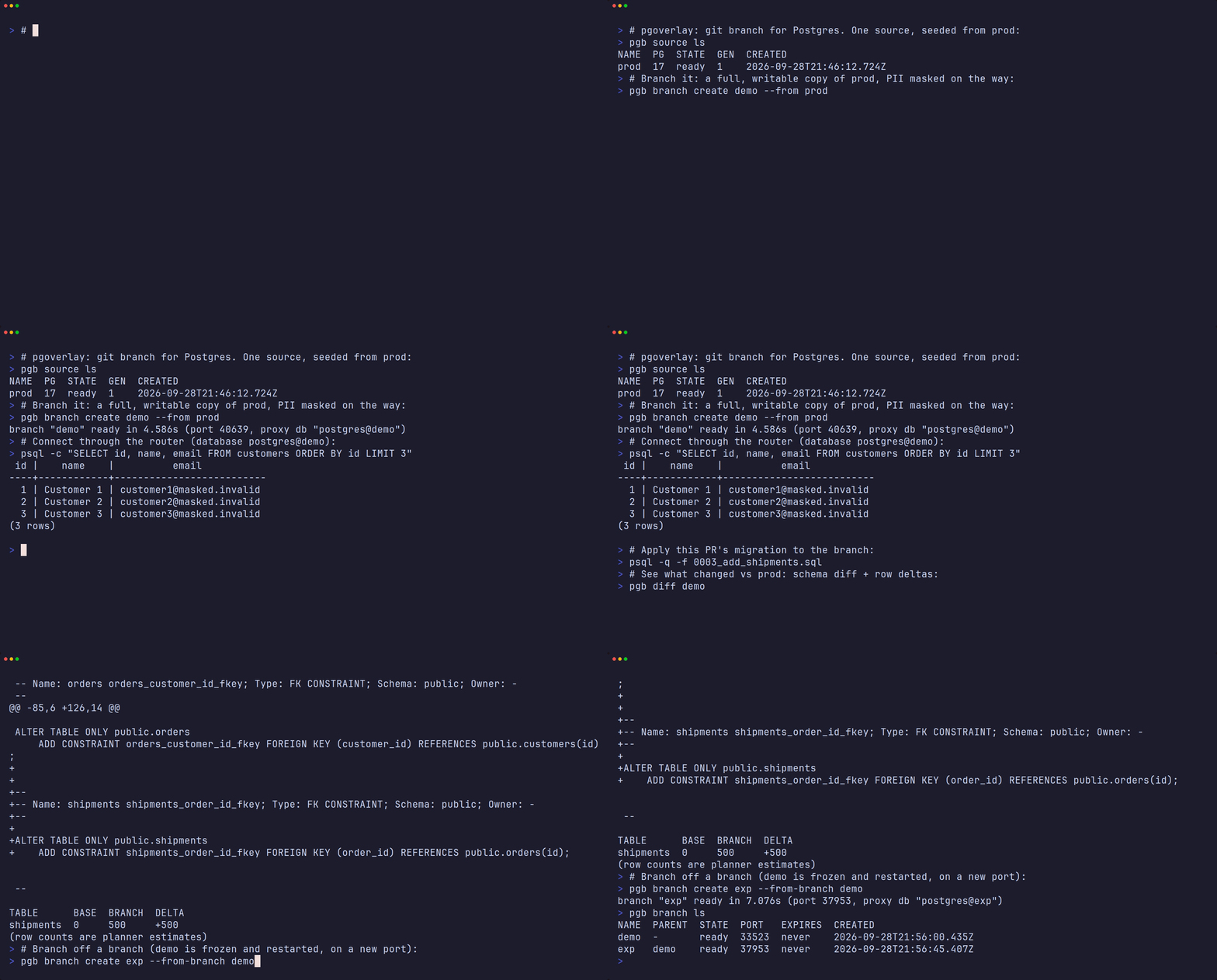
branch a masked clone of prod → query it through the router → apply a migration → pgb diff (schema + row deltas) → branch the branch. Recorded for real against a running branchd.
A note that informs several patterns below — credential modes:
- inherit (default) — every branch shares the source's credentials. A static connection string works for any branch, which is what fixed configs (Vercel-style env vars) need. It also means a branch accepts the source's production passwords.
- rotation (
--rotate-branch-credentials) — every branch gets its own password. Safer for shared/long-lived branches, but a consumer must fetch the per-branch password (from the REST API) rather than hold a static one. Rotated passwords are encrypted at rest in the registry DB (AES-256-GCM) under a dedicated key that is independent ofPGOVERLAY_TOKEN:$PGOVERLAY_SECRET_KEY, else--secret-key-file($PGOVERLAY_SECRET_KEY_FILE), else<state dir>/secret.key, which branchd generates (mode 0600) on first start. RotatingPGOVERLAY_TOKENdoes not touch stored passwords: restart branchd with the new token and every branch keeps working. Keep the key with the registry (back them up together). To rotate the at-rest key itself, set the new key and put the old one inPGOVERLAY_SECRET_KEY_PREVIOUSfor one start (a generatedsecret.keyleft in the state dir is picked up automatically); branchd re-encrypts every password under the new key. If the key is lost, branches whose passwords it encrypted keep working for list, routing, reset and destroy but reportpassword_unavailable: truewith nopassword; reset them to mint a new password. Registries from before the dedicated key (encrypted undersha256(PGOVERLAY_TOKEN)) are re-encrypted automatically on the first start with the same token. Local-modepgbreads the same keys from the state dir (or the same variables).
Rotation and static config — the connect helper. With rotation on, an
app can't hold a fixed PGPASSWORD. The pgoverlayconnect helper resolves
this: the static config the app holds is the branchd API endpoint plus a
read-only (viewer) token; it fetches the branch's current credentials at
startup. App and webhook agree on the branch name with no coordination: both
derive it from the repository plus the pull request number or head branch
(the rule is in GitHub App).
pr, _ := strconv.Atoi(os.Getenv("PR_NUMBER"))
res, _ := pgoverlayconnect.Resolve(ctx, pgoverlayconnect.Options{
    Server: os.Getenv("PGOVERLAY_API"), Token: os.Getenv("PGOVERLAY_TOKEN"), // viewer token
    Repo: os.Getenv("GITHUB_REPOSITORY"), PR: pr, // or Ref: os.Getenv("GITHUB_HEAD_REF")
    ProxyHost: "proxy.example.com:6432",
})
db, _ := sql.Open("pgx", res.ProxyDSN)
import { resolve } from "pgoverlay-connect";
const { proxyDsn } = await resolve({
  server: process.env.PGOVERLAY_API, token: process.env.PGOVERLAY_TOKEN,
  repo: `${process.env.VERCEL_GIT_REPO_OWNER}/${process.env.VERCEL_GIT_REPO_SLUG}`,
  ref: process.env.VERCEL_GIT_COMMIT_REF, // or pr: <number>
  proxyHost: "proxy.example.com:6432",
});
1. Local development
Seed once from any reachable Postgres, then branch as many times as you like. Branches are real, writable Postgres instances; throw them away freely.
# seed a source from prod (a standby is recommended); pg_basebackup is used
PGPASSWORD=… pgb source add prod --host replica.internal --user repl
# …or from a managed provider (Supabase/Neon/RDS) that blocks basebackup:
PGPASSWORD=… pgb source add prod --via dump --dump-schema public \
  --host db.<ref>.supabase.co --user postgres --pg-version 17

pgb branch create feature-x --from prod   # ready in ~2s, ~33 MiB to start
psql "$(pgb connect feature-x)" -c "ALTER TABLE orders ADD COLUMN tag text"
pgb branch reset feature-x                 # discard all changes, pristine again
pgb branch create exp --from-branch feature-x   # branch off a branch
pgb branch destroy exp
pgb branch destroy feature-x
A branch starts at about 33 MiB and grows by the table files it writes
(each copied once, up to 1 GiB per segment; only the changed blocks where the
volumes sit on XFS or btrfs); reads copy nothing
(how). pgb branch ls
--usage shows where each one stands. With --ttl, branches expire when a
branchd reconcile pass or pgb gc runs; local mode does not reap on its
own. A branch that ends up failed can often be brought back with its data:
see Troubleshooting.
Scrub PII once on the source and every branch inherits the masking:
pgb source set-mask prod mask-pii.sql      # SQL run before a branch is ready
pgb source get-mask prod                   # what runs, in order
pgb source clear-mask prod                 # stop masking new and reset branches
Masking runs inside each new or reset branch, over the local socket, before
the branch is marked ready; a failing script fails the branch. Scripts must be
idempotent (a branch of a branch runs them again on already-masked data), and
the source's pg_hba.conf must let the connection user in over the local
socket without a password (see Troubleshooting).
The seed itself stays unmasked, so masking protects the branches, not the
host they run on.
2. A database per test
Give every test (or test binary) its own isolated, prod-shaped database that is destroyed when the test finishes — no shared fixtures, no cleanup.
Go (github.com/abd-ulbasit/pgoverlay/pgoverlaytest):
func TestOrders(t *testing.T) {
    b := pgoverlaytest.Acquire(t)          // a branch, auto-destroyed via t.Cleanup
    db, _ := sql.Open("pgx", b.ProxyDSN)   // through the router
    // …run the test against real prod-shaped data…
}
JavaScript (pgoverlay-test, zero deps, Node 18+):
import { acquire } from 'pgoverlay-test';
const branch = await acquire({ source: 'prod' });
// use branch.proxyDsn …
await branch.destroy();
CI (reusable Action):
- uses: abd-ulbasit/pgoverlay/action@v1
  id: branch
  with:
    server: ${{ vars.PGOVERLAY_SERVER }}
    token: ${{ secrets.PGOVERLAY_TOKEN }}
    source: prod
- run: go test ./...
  env:
    PGHOST: ${{ steps.branch.outputs.proxy_host }}
    PGPORT: ${{ steps.branch.outputs.proxy_port }}
    PGDATABASE: ${{ steps.branch.outputs.proxy_database }}
    PGUSER: ${{ steps.branch.outputs.user }}
    PGPASSWORD: ${{ steps.branch.outputs.password || secrets.DB_PASSWORD }}
- uses: abd-ulbasit/pgoverlay/action/destroy@v1
  if: always()
  with:
    server: ${{ vars.PGOVERLAY_SERVER }}
    token: ${{ secrets.PGOVERLAY_TOKEN }}
    branch: ${{ steps.branch.outputs.branch }}
The SDKs and the Action are integration-only (they talk to a running
branchd); point them with PGOVERLAY_SERVER/PGOVERLAY_TOKEN, and at the
router with PGOVERLAY_PROXY_HOST / the proxy_host input when it has its
own address. Connect through the router: the direct host/port work only
from the branchd host or inside the cluster. See Testing.
3. Branch per pull request
Run pgoverlay-github (the webhook service, in the Helm chart as
ghook.enabled=true). Each PR gets a branch, a pgoverlay/branch commit
status that turns green once the branch is ready, and a comment with the
connection string.
# values.yaml (excerpt)
ghook:
  enabled: true
  source: prod
  resetOnPush: true        # new commits reset the branch to a fresh snapshot
  branchNaming: git-branch # gh-<repo-key>-<head branch>, not gh-<repo-key>-pr-<N>
  proxyHost: pg.example.com:6432
branchNaming: git-branch matters for preview platforms: the branch is named
after the repository and the PR's head branch (feat/login in
acme/widgets becomes gh-d782c8-feat-login), so a deploy can derive the
database branch from the git ref it already knows — available on the first
build, before the PR-number association exists. Pull requests from forks are
always named by number. Full setup and the naming rule:
GitHub App.
4. Preview environments
The complete "Vercel-style" experience — each PR gets a deployed app and its own database — is two cooperating pieces:
- pgoverlay supplies the per-PR database branch (use case 3).
- your platform/CI deploys the app for the PR and points it at that branch. pgoverlay deliberately doesn't deploy apps; that's the platform's job.
The app derives its branch from the repository and the git ref (matching
branchNaming: git-branch), so configuration is static — no per-PR secrets.
refBranchName from pgoverlay-connect applies the same rule as the webhook
service:
import { refBranchName } from "pgoverlay-connect";

// e.g. gh-d782c8-feat-login for acme/widgets, head branch feat/login
const branch = refBranchName(
  `${process.env.VERCEL_GIT_REPO_OWNER}/${process.env.VERCEL_GIT_REPO_SLUG}`,
  process.env.VERCEL_GIT_COMMIT_REF);
const pool = new Pool({ host: PGOVERLAY_HOST, port: 6432,
  user: 'app', password: PGOVERLAY_PASSWORD,             // inherit mode → static
  database: `appdb@${branch}` });                        // proxy routes by name
(A pull request from a fork gets a gh-<repo-key>-pr-<n> branch instead;
with credential rotation on, use resolve() as shown at the top of this
page.)
Two ways to wire the deploy, both demonstrated in pgoverlay-demo:
- Managed platform (Vercel/Netlify/Render) — set
PGOVERLAY_HOSTetc. as project env vars pointing at the proxy; the platform builds a preview per PR and the app connects through the proxy withdbname@branch. Use inherit credentials (static env). Requires the proxy to be reachable from the platform (a public LoadBalancer): read Security first, and mask the source. - Self-hosted (GitHub Action → your cluster) — a
pull_requestworkflow deploys the app image to the cluster pointed at the branch and posts the preview URL. See the demo repo's.github/workflows/pr-preview.yml.
Don't give CI a cluster-admin kubeconfig. The preview pipeline only ever deploys into one namespace, so scope it there. Apply the namespaced ServiceAccount + Role in
deploy/preview-deployer-rbac.yamlonce (no ClusterRole), then mint a short-lived token for the workflow instead of a long-lived admin credential:kubectl apply -f deploy/preview-deployer-rbac.yaml kubectl -n pgoverlay-preview create token preview-deployer --duration=24hThat Role is broader than "only the chart's objects", for two reasons. Kubernetes only lets it create branchd's Role if it holds every permission that Role grants (pods/exec, pods/log, Secrets create/delete, and per mode VolumeSnapshots, Leases and pod patch), and Helm's default release storage lists Secrets, which returns their contents, so the deployer can read every Secret in
pgoverlay-preview. Keep that namespace dedicated to pgoverlay; running Helm withHELM_DRIVER=configmapnarrows it (the file's header explains how).For branchd's own REST API, mint a scoped bearer rather than reusing the built-in
PGOVERLAY_TOKENadmin:pgb token create ci --role operatorgives CI exactly branch create/reset/recover/destroy andpgb diff(pgb tokenis admin-only). Token names are lowercase letters, digits,.,_and-, androotis reserved. Aviewertoken only reads: it cannot runpgb diff, which provisions a throwaway instance.Reachability note: managed platforms live on the public internet, so the Postgres proxy must be publicly reachable (e.g. a cloud LoadBalancer). A private cluster (Tailscale/VPN-only) can serve the webhook publicly but not a raw-TCP proxy — there, run the preview app inside the cluster.
5. Reviewing migrations with pgb diff
See exactly what a branch's migrations did, against prod-shaped data, before merging — schema diff plus per-table row deltas vs the branch's own base:
$ pgb diff feature-x
@@ … @@
+CREATE TABLE public.shipments ( id bigint, order_id bigint NOT NULL, … );
+ALTER TABLE ONLY public.orders ADD CONSTRAINT orders_shipment_fkey …

TABLE      BASE   BRANCH  DELTA
orders     51230  51198   -32
shipments  0      1204    +1204
(row counts are planner estimates)
Only tables whose count changed are listed (--all lists every table); a
schema-only change prints tables: no row-count changes. Tables outside
public show as schema.table, and a count that is unknown (a table never
analyzed and larger than 64 MiB) shows as ?. Seeds are analyzed when they
are settled, so a small change to a seeded table appears once the branch has
analyzed that table: autovacuum does it after enough changed rows, or run
ANALYZE in the branch before the diff. --data adds up to --sample
(default 20, at most 500) new rows per grown table, matched by primary key;
it checks the branch's highest keys, so new rows with random keys (UUIDs) in
a large table can be missed.
Run it by hand, or post it on the PR from CI (GHOOK_DIFF_ON_PUSH). It spins
up a throwaway branch from the base a reset would return the branch to, dumps
both, and tears the throwaway down. On the overlay backend that base is the
point the branch was created from. For a branch created from another branch
on the zfs or csi backend it is the parent's current state, so changes the
parent made after the fork show up reversed in the child's diff; on csi, the
diff also briefly stops and restarts the parent. Diff needs an operator
token.
For deployment specifics see Kubernetes and Running on EKS; for how it all works, Architecture.